
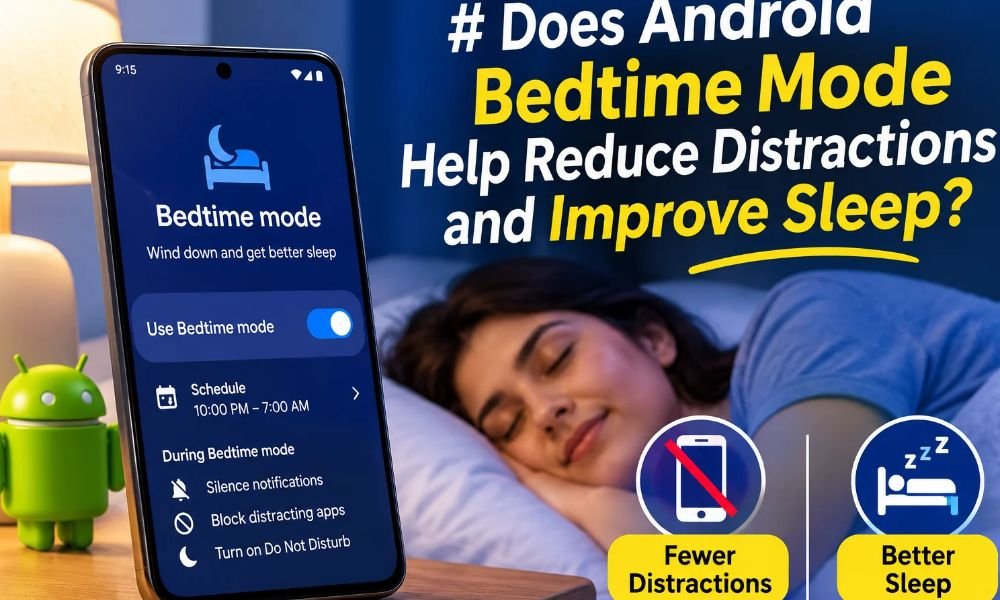
In the fast-paced world, getting proper sleep is important for maintaining a healthy lifestyle, but continuous smartphone notifications, screen brightness, and unnecessary distractions can disturb your sleeping routine. To address these problems, smartphone manufacturers offer different features that help users reduce interruptions at night.
Android Bedtime Mode is one such feature that helps you create a peaceful nighttime environment by automatically changing your phone’s settings according to your sleep schedule. It can silence notifications, remove the screen’s color through grayscale, and reduce distractions while you are sleeping.
However, many users are confused about whether Bedtime Mode is available only on Android, whether it blocks internet usage, and how it differs from Samsung’s Sleep Mode and Apple’s Sleep Focus. Let’s understand how these features work and which one offers a better experience.
What Is Android Bedtime Mode?
Android Bedtime Mode is a feature available through Google’s Digital Wellbeing tools. It helps users manage their smartphone usage before going to sleep and avoid unnecessary distractions during nighttime. Continuous notifications and messages can disturb your peace of mind and increase stress. Android Bedtime Mode helps minimize these distractions, allowing you to enjoy a quieter and more relaxing nighttime routine.
When you enable this feature, your Android phone can automatically change selected settings according to your preferred bedtime schedule. For example, you can activate Do Not Disturb, enable grayscale, and reduce screen brightness to make your device less distracting.
The main purpose is simple: your Android phone can stay dark and quiet while you sleep, allowing you to avoid unnecessary notifications and screen distractions.
Bedtime Mode is particularly useful for people who frequently check their smartphones before sleeping or receive notifications throughout the night. Before using Bedtime Mode, you may have commonly relied on Dark Mode, Eye Comfort/Night Light, or Focus Mode to reduce screen distractions and improve nighttime comfort.
One important thing to understand is that Bedtime Mode does not automatically disable all internet connectivity. If you are searching for a feature that completely blocks mobile data or Wi-Fi during specific hours, you may need to use separate device settings or parental-control tools.
What Are the Main Features of Android Bedtime Mode?
Android Bedtime Mode offers several useful settings that help you manage your smartphone at night. The available options may differ depending on your Android version and smartphone manufacturer.
1. Automatically Changes Your Android Settings at Night
One of the most useful advantages is that you do not need to manually adjust your smartphone settings every night. You can create a bedtime schedule, such as 10 PM to 7 AM. Once the schedule is activated, your phone automatically applies the selected nighttime settings.
For example, you can configure your smartphone to activate Do Not Disturb and grayscale at your preferred time. This makes it easier to maintain a consistent nighttime routine without repeatedly opening different settings.
2. Silence Your Phone and Reduce Notifications
Continuous notifications are one of the biggest distractions when you are trying to sleep. Bedtime Mode works with Do Not Disturb to silence notifications and reduce interruptions. Depending on your device and configuration, you can also allow selected contacts or important notifications to reach you.
For example, you may want to receive calls from family members while silencing notifications from social media applications. If someone calls you while Bedtime Mode is active, you may receive a notification about the missed call after Bedtime Mode ends. This gives you better control over which notifications can interrupt your sleep.
3. Remove the Screen’s Color With Grayscale
Another useful feature is grayscale mode. When you enable grayscale, your smartphone display switches from its usual colorful appearance to shades of gray. This makes the screen less visually engaging and can discourage unnecessary scrolling through social media applications and reduce screen time.
If you frequently spend time watching videos or browsing social media before sleeping, grayscale can help reduce the attraction of your smartphone screen. You can enable this option through Bedtime Mode settings if your device supports it.
4. Reduce Blue Light With Night Light
Many Android smartphones offer a Night Light feature that changes the display to a warmer color. Instead of displaying the usual cooler tones, Night Light applies a warmer screen appearance that some users find more comfortable in low-light environments.
You can schedule Night Light separately or coordinate its schedule with your bedtime routine, depending on your device. However, blue-light reduction should not be considered a guaranteed solution for sleep problems. Reducing screen usage before bedtime and maintaining a consistent sleeping schedule are also important.
5. Bedtime Scheduling and Wind-Down Options
Android allows users to schedule Bedtime Mode according to their preferred sleeping hours. For example, if you normally sleep at 10:30 PM, you can configure your phone to activate Bedtime Mode around that time.
Some devices also provide additional bedtime reminders and wind-down options through their Clock or Digital Wellbeing applications. The available scheduling options depend on your device and software version.
Does Bedtime Mode Allow You to Block All Data Usage During Set Time Periods?
Many users believe that Bedtime mode allows you to block all data usage during set time periods. However, this is not exactly how the feature works. Bedtime Mode primarily focuses on reducing distractions rather than completely disconnecting your smartphone from the internet.
When you enable it, your phone can silence notifications, change the screen appearance, and activate other selected nighttime settings. However, Wi-Fi and mobile data can remain active.
If you want to restrict internet access during particular hours, you may need to configure separate settings, such as app timers, parental controls, or network restrictions.
For example, you can use app timers to limit the time you spend on particular applications. Similarly, parental-control tools can help manage screen time and access to selected applications. iOS 27 also offers parental control features that help parents manage screen time, restrict content, and create a safer digital environment for their children.
Therefore, Bedtime Mode is more suitable for managing nighttime smartphone distractions than blocking all data usage and helps to better sleep.
Is Android Bedtime Mode Available on Android 14 Only?
No. Android Bedtime Mode is not exclusive to Android 14. It is available for all android users. Google introduced Bedtime Mode through its Digital Wellbeing and Clock experiences on supported Android devices. Its availability and features depend on the Android version, manufacturer, and software implementation.
You can find similar bedtime settings on several smartphone brands, including Google Pixel, Samsung Galaxy, and other Android devices. However, the exact menu names and available options may vary.
For example, some smartphones provide Bedtime Mode through Digital Wellbeing, while others offer nighttime scheduling through their own system applications.
How to enable Android Bedtime Mode:
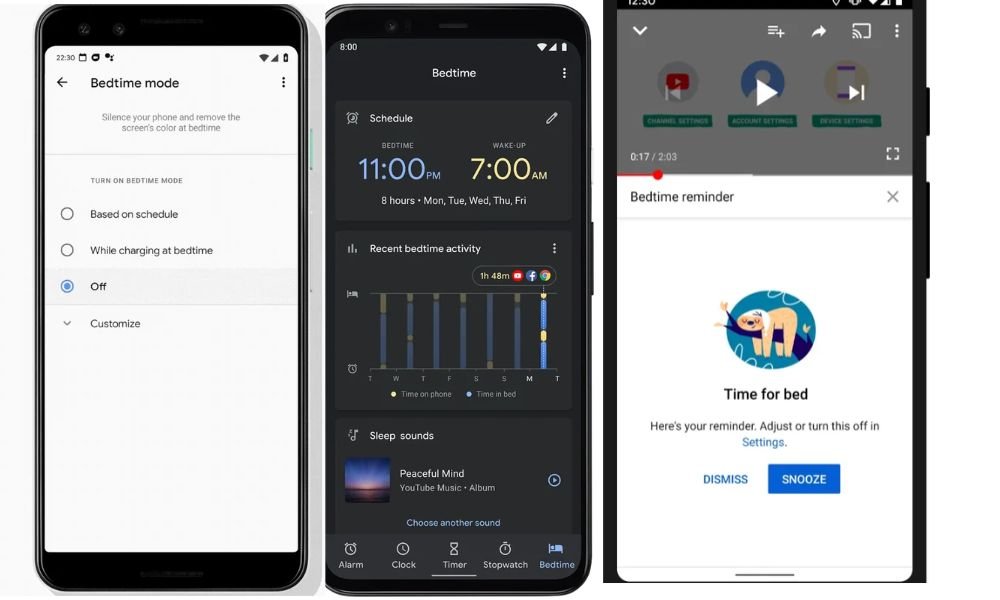
- Open your smartphone’s Settings.
- Select Digital Wellbeing & parental controls.
- Find Bedtime Mode.
- Choose your preferred bedtime schedule.
- Enable available options such as Do Not Disturb and grayscale.
- Save your settings and allow the schedule to activate automatically.
You can also check the Clock application for bedtime scheduling options. You can enable or disable Bedtime Mode whenever you want, depending on your needs.
If you cannot find Bedtime Mode, check whether your smartphone supports Google’s Digital Wellbeing features or offers an equivalent feature under another name.
What Is Samsung Sleep Mode?
Samsung Galaxy users also get nighttime features, but Samsung uses the name Sleep Mode within its Modes and Routines functionality. It provides similar functionality by allowing users to configure their smartphone for sleeping hours. You can create a Sleep Mode schedule and customize different settings according to your preferences.
For example, Samsung users can configure options such as:
- Enable Do Not Disturb during sleeping hours.
- Set the screen to grayscale.
- Reduce brightness.
- Configure allowed contacts and notifications.
- Apply selected settings automatically according to a schedule.
Samsung’s Sleep Mode offers additional customization through the Modes and Routines experience, although available options depend on your Galaxy model and One UI version.
What Is Apple’s Sleep Focus?
Apple provides a similar nighttime experience through Sleep Focus, which works with the Health app and Sleep Schedule. You can create a sleeping schedule and decide when Sleep Focus should automatically activate.
Once enabled, it helps reduce distractions by silencing notifications and limiting interruptions from selected people and applications. Apple also provides a Wind Down option that can activate Sleep Focus before your scheduled bedtime. For example, if your sleeping time is 11 PM, you can configure Wind Down to begin 30 minutes earlier.
You can also customize your Lock Screen and choose which notifications are allowed. Unlike Android Bedtime Mode, Apple’s Sleep Focus is integrated with the iPhone’s Focus features and the Health app’s sleep-tracking experience.
Android Bedtime Mode vs Samsung Sleep Mode vs Apple Sleep Focus
Although all three features are designed to reduce nighttime distractions, their implementation and customization options are different.
| Feature | Android Bedtime Mode | Samsung Sleep Mode | Apple Sleep Focus |
|---|---|---|---|
| Platform | Android | Samsung Galaxy | iPhone |
| Main location | Digital Wellbeing | Modes and Routines | Health and Focus |
| Scheduled activation | Yes, on supported devices | Yes | Yes |
| Do Not Disturb | Yes | Yes | Yes |
| Grayscale | Supported | Supported on compatible devices | Not a standard Sleep Focus setting |
| Notification control | Yes | Yes | Yes |
| Wind Down | Available on supported devices | Depends on device and settings | Yes |
| Sleep tracking integration | Depends on apps and device | Depends on Samsung Health and device | Apple Health |
All three options help you reduce unnecessary smartphone usage at night. However, the experience depends on your device and the software version.
Is Android Bedtime Mode Worth Using?
Yes, Android Bedtime Mode is a useful feature if you want to reduce nighttime smartphone distractions without manually changing several settings every day. Before Bedtime Mode, users often had to install third-party applications, such as sleep timers or mute-time apps, to manage notifications and reduce distractions at night.
Bedtime Mode simplifies this process by providing these useful settings directly through your smartphone’s built-in features. It is particularly helpful for people who receive frequent notifications, spend too much time scrolling through applications, or want to maintain a consistent sleeping schedule.
However, it is important to understand its limitations. Bedtime Mode does not completely block mobile data, automatically guarantee better sleep, or replace a proper sleep routine.
If you are using a Samsung Galaxy smartphone, Sleep Mode offers a similar experience through Modes and Routines. Meanwhile, iPhone users can use Sleep Focus to manage notifications and nighttime interruptions.
Android Bedtime Mode, Samsung Sleep Mode, and Apple Sleep Focus all offer practical ways to make your smartphone less distracting at night. The best option depends on your device and personal preferences. If you want to reduce screen distractions, silence your phone, and establish a consistent bedtime routine, these features are worth trying.
FAQs
1. Is Android Bedtime Mode available on Android 14 only?
No. Bedtime Mode is available on supported Android devices running older versions as well. However, available features depend on your Android version and smartphone manufacturer.
2. Does Android Bedtime Mode block mobile data?
No. Bedtime Mode does not automatically disable mobile data or Wi-Fi. It mainly manages notifications, screen appearance, and other nighttime settings.
3. What is Bedtime Mode called on Samsung phones?
Samsung provides a similar feature called Sleep Mode under Modes and Routines. It allows users to schedule nighttime settings and reduce distractions.
4. What is the iPhone alternative to Android Bedtime Mode?
Apple offers Sleep Focus, which works with the Health app and Sleep Schedule to silence notifications and reduce interruptions during sleeping hours.
5. Does Bedtime Mode improve sleep quality?
Bedtime Mode can help reduce smartphone distractions and encourage healthier nighttime habits. However, it does not guarantee better sleep quality or deeper REM cycles. Your sleep routine and overall habits also matter.