
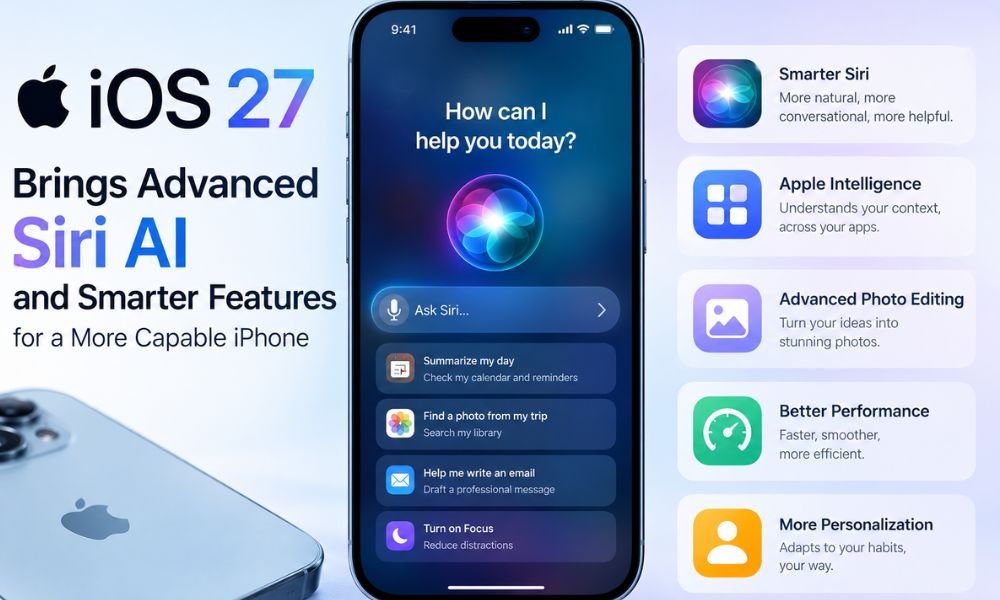
Apple continues to make the iPhone more intelligent and personalized with its latest software update. iOS 27 introduces Siri AI, expanded Apple Intelligence capabilities, advanced photo-editing tools, interface customization, improved system performance, and several new features across Apple’s ecosystem.
With this update, Apple is focusing heavily on artificial intelligence while also improving everyday functions such as Photos, Safari, Mail, Camera, Widgets, AirPods, Wallet, and accessibility.
The company is also introducing new health and parental-control features designed to make the iPhone more useful for different types of users. So, what makes iOS 27 different from previous versions? Here are the major features and improvements you need to know.
iOS 27 Will Introduce Major Apple Intelligence Upgrades
One of the biggest changes in the update is the expansion of Apple Intelligence. iOS 27 introduces major Apple Intelligence upgrades designed to provide more contextual and personalized assistance throughout the iPhone.
Apple Intelligence is integrated into more system apps and can provide smarter suggestions, automation, and assistance based on what users are doing. iOS 27 adds new Apple Intelligence features in apps, including Safari, Photos, Mail, Calendar, Home, and Shortcuts. iOS 27 offers a more advanced Siri experience than iOS 26, which features a more basic version of Siri with fewer AI-powered capabilities.
The goal is to make everyday tasks easier without requiring users to manually perform every step. You can turn Siri on or off according to your preference. Go to Settings > Siri, scroll down, and tap Turn Off Siri to disable Siri. However, there is no single button to completely disable all Apple Intelligence features.
Smarter and More Capable Siri
The revamped Siri is one of the most important additions in iOS 27. Apple is making Siri more conversational and context-aware, allowing the assistant to better understand requests and follow up on previous interactions.
Smarter and More Capable Siri can understand information on the screen and use personal context to provide more relevant responses. It can also work across apps such as Messages, Mail, Calendar, and Photos. Siri AI can better understand the content on your screen, analyze screenshots and images, and provide relevant responses based on the information it identifies. In some tasks, it can process and connect information more quickly than a person could manually.
Siri AI: Features a ChatGPT-Like Experience
The new Siri AI: Features a ChatGPT or Gemini-like conversational experience, allowing users to interact with Siri more naturally. Instead of relying only on short commands, users can have more detailed conversations and ask follow-up questions.
Siri can also reference relevant personal information, understand what is displayed on the screen, and assist with more complex tasks.
A dedicated Siri app is also expected to make it easier to revisit previous conversations, pin important chats, and synchronize conversations across compatible devices. When it comes to on-screen navigation, ChatGPT cannot perform certain actions that Siri AI can handle.
AI-Powered Tools in the Photos App
Photography receives another major upgrade in iOS 27. iOS 27 also introduces photo-editing capabilities that use Apple Intelligence to make editing easier. The AI-powered tools in the Photos app include features such as Clean Up, Extend, and Spatial Reframing. These tools can help users remove unwanted objects, expand an image, or adjust the composition of a photograph.
For example, Clean Up can help remove distracting elements from a photo, while Extend can expand the visible area around an image. Spatial Reframing provides additional flexibility when adjusting the composition.
Save Video Frames as Photos
Another useful photography improvement is the ability to save video frames as photos. This can be helpful when users capture a video but later discover a particular frame that they want to keep as a still image.
Together, these improvements make the Photos app more useful for both casual smartphone photographers and users who frequently edit images.
Liquid Glass Gets More Customization
Apple continues to refine the Liquid Glass design in iOS 27, offering a more flexible appearance compared with the more rigid Clear and Tinted options in iOS 26. OriginOS 7 also features a Liquid Glass-style design inspired by iOS 27.
The interface receives additional customization options, including a transparency slider that allows users to adjust the appearance and readability of certain interface elements. Dynamic color themes, redesigned folders, and sharper icons further refresh the overall appearance. These changes give users more control over how their iPhone looks while maintaining Apple’s modern visual design.
System Features and Performance Improvements
Beyond artificial intelligence, iOS 27 also includes several system features intended to improve everyday performance. Apple is focusing on faster app launches, smoother animations, improved network performance, and faster AirDrop transfers. Photos are also designed to load more quickly.
Other improvements include system-wide dictation, clipboard suggestions, and automated password updates. These changes may not appear as dramatic as a redesigned app, but they can make the iPhone feel faster and more convenient during everyday use.
Enhanced Widgets and Safari
Widgets are becoming more interactive in iOS 27. Extra-large widgets can provide additional information and allow users to interact with certain controls directly from the Home Screen.
Safari is also receiving improvements. Users can organize tabs by topics, receive notifications when monitored webpages change, and create customized extensions using natural-language commands.
These features could make Safari more useful for people who frequently manage multiple webpages or perform repetitive browsing tasks.
Camera and Visual Intelligence
The Camera app receives AI-related improvements through a new Siri Mode. Users can use the camera to recognize objects and receive contextual information directly from the viewfinder.
Visual Intelligence is also being expanded to provide more useful interactions with images, receipts, and other visual information.
These improvements demonstrate Apple’s broader focus on combining the camera with on-device intelligence to make the iPhone more useful in real-world situations.
New Health and Tracking Features
Health-related functionality is another area receiving attention. iOS 27 includes new menstruation, perimenopause and menopause tracking, giving users additional options for monitoring relevant health information.
The update also introduces improvements to sleep-related functionality, including the ability to edit sleep schedules more conveniently. These tools can make Apple’s health ecosystem more personalized, particularly for users who regularly track sleep and other wellness information.
AirPods and Audio Enhancements
iOS 27 also expands the audio experience for compatible AirPods. New custom EQ and adaptive audio controls allow users to adjust sound frequencies and noise cancellation according to their preferences and environment.
These features are available with compatible models, including AirPods Pro 3, AirPods 4, and AirPods Max 2.
Accessibility Improvements
Apple continues to expand its accessibility features with iOS 27. The update includes additional options intended to make the iPhone easier to use for people with different needs. The update also brings a new feature for system keyboards, alongside improvements designed to make typing and system interaction more convenient.
Accessibility remains an important part of Apple’s software strategy, allowing more users to customize their iPhone experience according to their individual requirements.
Child Safety and Parental Controls
iOS 27 also introduces additional child-safety features. Tools such as Ask to Browse, Time Allowances, and enhanced Communication Safety give parents more options for managing how children use their devices.
These controls can help parents manage app usage, web access, and communication while providing additional safeguards for younger users.
More Notable iOS 27 Features
Several other Apple apps and services also receive improvements.
Shortcuts: The new “Describe a Shortcut” feature can use natural-language instructions to help users create automations.
Apple Wallet: Users can scan receipts, split bills, and digitize membership cards, making Wallet more useful for everyday transactions and organization.
CarPlay: Apple is redesigning parts of the CarPlay experience with deeper Siri integration and customizable wallpapers.
iCloud Shared Albums: Shared Albums gain features such as full-resolution sharing, emoji reactions, and temporary albums for collaborative sharing.
iOS 27 Compatibility
iOS 27 is compatible with iPhone 11 and later, although some advanced Apple Intelligence capabilities require newer hardware, such as the iPhone 15 Pro or later.
This means older compatible iPhones can receive many of the system-level improvements, while some AI-powered features may be limited to newer models because of their hardware requirements.
Is iOS 27 Apple’s Best Update in Years?
With its combination of artificial intelligence, a revamped Siri, improved photography, system enhancements, accessibility improvements, health tracking, and interface customization, iOS 27 is Apple’s best update in years is a conclusion some users may reach based on the breadth of changes.
The most significant shift is clearly Apple’s growing focus on AI. Rather than keeping intelligence limited to a single assistant, Apple is bringing Apple Intelligence into more apps and everyday workflows.
The combination of Siri AI, AI-powered Photos editing, smarter system features, improved Safari, enhanced widgets, and personalized health tools makes iOS 27 a substantial software update for compatible iPhones.
For users with newer iPhones capable of supporting the latest Apple Intelligence features, the update offers a broader AI experience. Meanwhile, owners of older compatible iPhones can still benefit from system improvements, interface changes, accessibility features, and other new functionality.