
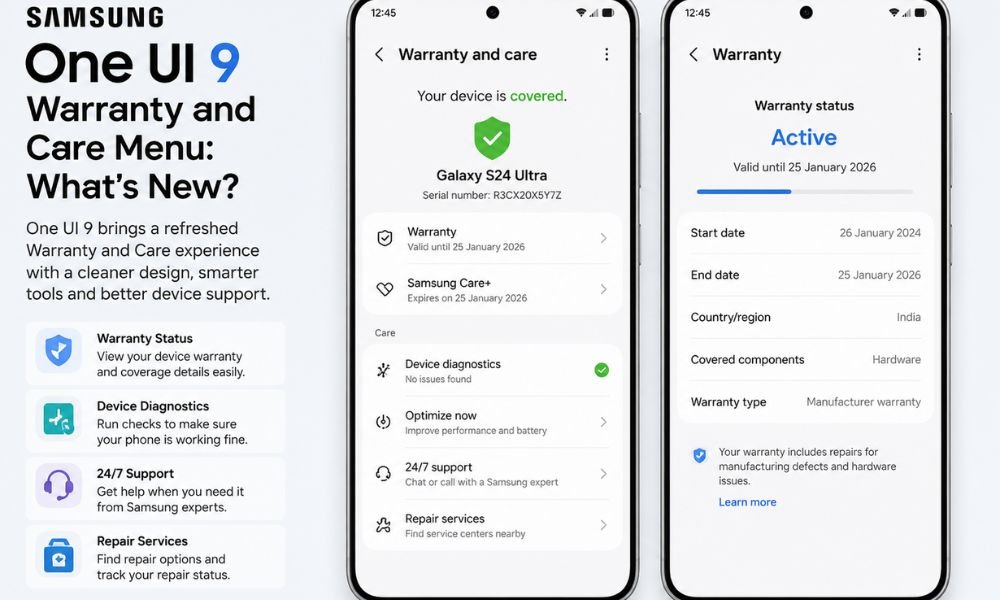
Samsung’s One UI 9 introduces a redesigned support experience that aims to make warranty management, device diagnostics, repairs, and customer support easier to access. The new Warranty and Care menu brings several important service-related tools together inside the Settings app, reducing the need to search through different sections or use separate support channels.
The new feature shows warranty status and provides users with information about their device’s warranty periods, expiration dates, repair options, diagnostics, and support tools.
With everything available in one place, Samsung is making it easier for Galaxy users to understand their device coverage and get assistance when something goes wrong. Warranty and care is the fastest way to get answers and support for your Galaxy device like Galaxy Z Fold8 Ultra, Galaxy Z Fold8, and Galaxy Z Flip8 and more.
What Is the Warranty and Care Menu in One UI 9?
Samsung’s new Warranty and Care menu in One UI 9 is designed as a centralized hub for managing Galaxy device support. Instead of checking warranty information separately or contacting Samsung support for every issue, users can access important information directly through the Warranty and care section in Settings.
The One UI 9 Warranty and Care menu is expected to provide information related to warranty coverage, Samsung Care+ eligibility, diagnostics, repairs, and support. This can be particularly useful for users who own multiple Samsung devices and want to manage their coverage from a single location.
Samsung’s approach essentially centralizes repair tracking, hardware diagnostics, and support within the Galaxy software experience.
Centralized Warranty Management
One of the most useful additions is improved warranty management. With the new menu, users can keep track of your warranty periods and expiration dates without navigating through multiple pages.
The device currently being used can be displayed prominently, while other eligible or linked Samsung devices can also appear in the same interface. This provides users with a convenient overview of their Galaxy warranty details.
In other words, users can check warranty status directly from Settings instead of searching for purchase information or contacting customer support to determine whether a device is still covered.
The feature could be particularly useful when a device starts experiencing hardware problems. Before paying for a repair, users can check whether their device is still under warranty and determine what support options may be available.
Galaxy Warranty Details at a Glance
The new interface provides users with information about their device’s warranty periods and related coverage. Having this information readily available can help Galaxy owners make better decisions when their smartphone, tablet, smartwatch, or another supported device requires attention.
The menu may also display relevant Samsung Care+ information, including whether a particular device is eligible for enrollment. It is available in select regions and is not available globally.
This creates a more straightforward way to manage Galaxy warranty details and understand the protection available for a device.
Integrated Device Diagnostics
Another major part of the new experience is hardware diagnostics. Samsung has been expanding its built-in diagnostic capabilities, and One UI 9 brings these tools closer to the warranty and support experience.
The menu can provide access to diagnostic checks for important hardware and functions, including the battery, charging system, sensors, touch functionality, and connectivity.
These repairs, diagnostics, and support tools can help users identify potential problems before arranging professional service.
For example, if a user notices that their phone is not charging correctly, diagnostic tools can help determine whether the issue may be related to the charging system or another component. Similarly, hardware checks can help identify potential problems with sensors or touch response.
This approach can reduce the need for third-party diagnostic applications and give users a more direct way to understand the condition of their Galaxy device.
Bixby-Powered Diagnostics
One interesting aspect of Samsung Warranty Care in One UI 9 is the integration of Bixby-powered diagnostic capabilities.
Rather than simply presenting warranty information, Samsung is combining coverage details with troubleshooting tools. This means users can potentially check their device’s condition before deciding whether a repair or service appointment is necessary.
The integration of diagnostics into the same menu makes the overall support process more convenient. Users can move from identifying a potential hardware issue to checking warranty coverage and exploring repair options without leaving the Settings environment.
Simplified Repairs and Service Requests
The redesigned Warranty and Care experience also focuses on making repairs easier to arrange.
Instead of calling Samsung customer service, users can potentially initiate a service request directly through the interface. Depending on the market and device, this may include booking a repair at an authorized Samsung service center.
This is especially helpful for users who already know that their device requires professional attention. The system can also help users understand available service options before visiting a repair center. Samsung-authorized service centers use trained technicians and genuine replacement parts, helping maintain the reliability and performance of Galaxy devices.
Scheduled Repair Section
A particularly useful element is the Scheduled Repair section, which is designed to make repair management more organized. Rather than treating a repair appointment as a separate process, Samsung can provide users with a centralized place to view or manage scheduled service information.
The Scheduled Repair section can be useful for keeping track of an upcoming appointment and understanding the status of a service request. For users who frequently need repairs or own several Samsung devices, having repair information accessible from the same support interface can make the process considerably easier.
Remote Support Options
Not every problem requires an immediate visit to a service center. For software-related issues or problems that can be diagnosed remotely, Samsung’s support ecosystem can also provide remote assistance.
The Warranty and Care experience brings support options closer to the user, making it easier to seek help when visiting a service center is inconvenient. Remote support can be particularly useful for troubleshooting software settings, identifying common problems, or guiding users through potential solutions.
Repair Cost Transparency
Another potentially useful aspect of the redesigned menu is access to estimated repair costs. Before proceeding with a repair, users may be able to see estimated costs associated with major components or common repairs. This gives Galaxy owners a better idea of what they might have to pay if their device is outside its warranty coverage. The information can also help users understand the potential financial benefits of Samsung Care+.
For example, if a repair would otherwise be expensive, users can compare the estimated repair cost with the protection available through Samsung Care+. This makes it easier to evaluate whether additional device protection is worthwhile.
Why the Warranty and Care Menu Matters
Samsung’s new Warranty and Care menu in One UI 9 is more than a simple warranty checker. It combines several aspects of device ownership into one centralized experience.
Previously, users might have needed to visit different sections to check warranty information, troubleshoot hardware, arrange repairs, or contact support. The new system aims to bring these tasks together.
The biggest advantages include:
- A centralized location for warranty information
- Easier access to Galaxy warranty details
- The ability to keep track of your warranty periods and expiration dates
- Built-in hardware diagnostics
- Samsung Care+ eligibility information
- Easier repair scheduling
- A dedicated Scheduled Repair section
- Repair tracking and support options
- Potential repair-cost estimates
- Access to remote assistance
Samsung Warranty Care in One UI 9: What Users Can Expect
With Samsung Warranty Care in One UI 9, the company appears to be focusing on making post-purchase device support more accessible. The combination of warranty tracking, diagnostics, repairs, and support tools can save users time when dealing with common device problems.
The Warranty and care section in Settings also makes the feature easier to discover because users do not necessarily need to download another application or search Samsung’s website to find basic information.
However, the exact availability of individual warranty, repair, diagnostic, Samsung Care+, and remote-support features can vary depending on the country, device model, and Samsung’s regional service infrastructure.
Final Thoughts
The One UI 9 Warranty and Care menu could become a useful addition for Galaxy users who want easier access to device support. By combining warranty information, diagnostics, repairs, cost information, and customer support into a single interface, Samsung is simplifying several tasks that previously required separate steps.
As Samsung details the new Warranty and care menu in One UI 9, the focus is clear: provide users with a centralized place to understand their coverage, diagnose potential hardware problems, schedule repairs, and access support.
Overall, the new menu in One UI 9 makes Galaxy device ownership more convenient by bringing essential warranty and service information directly into Settings.