
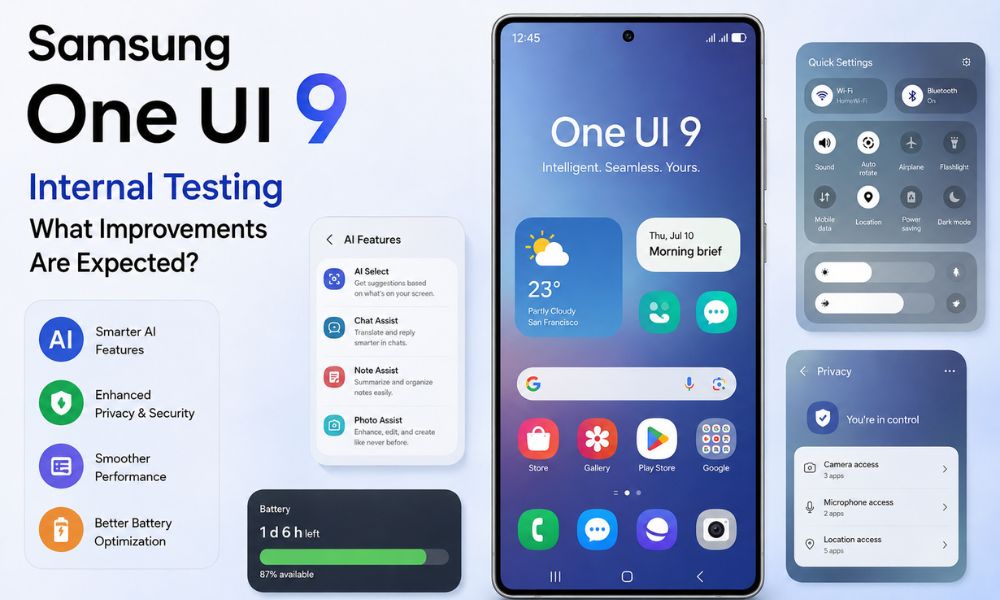
Samsung has reportedly started internal testing of One UI 9, its next major Android skin based on Android 17. According to recent reports, the company is testing the software on 49 Galaxy smartphones and tablets, covering flagship, foldable, mid-range, and budget devices. Although Samsung has not officially announced the complete list of supported devices or every new feature, the internal testing phase suggests that development is progressing steadily.
One UI 9 is expected to focus less on major visual redesigns and more on Galaxy AI enhancements, smoother performance, improved battery optimization, stronger privacy controls, and deeper Android 17 integration. As with every major software release, Samsung is thoroughly testing the update to ensure a stable experience before making it available to users.
If you own a recent Galaxy smartphone or tablet, here’s everything you need to know about Samsung’s upcoming One UI 9 update.
Scope of Internal Testing
Samsung is reportedly conducting internal testing of One UI 9 across 49 Galaxy devices. The goal is to identify bugs, improve compatibility, optimize battery life, and ensure smooth performance before expanding the beta program and eventually releasing the stable version.
Recent reports suggest that One UI 9 introduces several refinements, including a redesigned independent Quick Panel layout, improved location privacy indicators with Android’s blue-dot notification system, enhanced Galaxy AI capabilities, and deeper integration with Google’s latest AI technologies.
The devices reportedly included in internal testing are:
Galaxy S Series
- Galaxy S23
- Galaxy S23+
- Galaxy S24
- Galaxy S24+
- Galaxy S24 Ultra
- Galaxy S24 FE
- Galaxy S25
- Galaxy S25+
- Galaxy S25 Ultra
- Galaxy S25 FE
Galaxy Z Fold and Flip Series
- Galaxy Z Fold 5
- Galaxy Z Fold 6
- Galaxy Z Fold 7
- Galaxy Z Flip 5
- Galaxy Z Flip 6
- Galaxy Z Flip 7
Galaxy A Series
- Galaxy A07
- Galaxy A16
- Galaxy A17
- Galaxy A26
- Galaxy A27
- Galaxy A35
- Galaxy A36
- Galaxy A37
- Galaxy A55
- Galaxy A56
- Galaxy A57
Galaxy M Series
- Galaxy M34
- Galaxy M35
- Galaxy M56
Galaxy Tab Series
- Galaxy Tab S9
- Galaxy Tab S9+
- Galaxy Tab S9 Ultra
- Galaxy Tab S10+
- Galaxy Tab S10 Ultra
- Galaxy Tab S10 FE
- Galaxy Tab S10 FE+
- Galaxy Tab S10 Lite
- Galaxy Tab S11
- Galaxy Tab S11 Ultra
- Galaxy Tab A11
Based on Samsung’s current software update policy, the Galaxy S22 series and Galaxy S21 FE are not expected to receive One UI 9. These devices are expected to remain on One UI 8.5 based on Android 16 as they reach the end of their eligible major Android OS upgrades. It is important to remember that this testing list is based on reports and may change before Samsung officially announces the rollout.
Expected Features and Improvements
Samsung appears to be positioning One UI 9 as a refinement update rather than a complete redesign. Instead of introducing dramatic visual changes, the company is expected to improve the overall user experience through better performance, smarter AI tools, and enhanced system stability.
Faster Performance
One UI 9 is expected to deliver:
- Faster app launching
- Smoother animations
- Better multitasking
- Improved RAM management
- Optimized background processing
- Reduced app reloads
These optimizations should make Galaxy devices feel more responsive during everyday use.
Better Battery Optimization
Battery efficiency remains a major focus for Samsung.
Expected improvements include:
- Lower background power consumption
- Smarter battery management
- Better standby performance
- More efficient CPU scheduling
- Improved charging optimization
These changes could help users enjoy longer screen-on time without requiring larger batteries.
Galaxy AI Gets Smarter
Samsung continues expanding its Galaxy AI platform, and One UI 9 is expected to introduce several new AI-powered features.
Potential improvements include:
- Smarter Writing Assist
- Improved voice transcription
- Faster AI image editing
- Better object recognition
- More intelligent search suggestions
- Personalized recommendations
- Enhanced productivity tools
Reports also suggest deeper Google Gemini integration, allowing AI-powered features to work more naturally throughout the operating system.
Camera Improvements
Although One UI 9 is primarily a software update, Samsung is expected to improve camera performance through software optimization.
Possible enhancements include:
- Faster image processing
- Better HDR performance
- Improved Night Mode
- Enhanced portrait processing
- More consistent color reproduction
- Smoother camera transitions
These improvements will depend on the hardware capabilities of individual Galaxy devices.
Privacy and Security
Samsung has consistently strengthened security with every One UI release.
Expected improvements include:
- Better permission controls
- Enhanced privacy dashboard
- Improved notification management
- Location privacy indicators
- Stronger Knox protection
- Better app permission transparency
These features aim to give users greater control over their personal information.
More Customization
One UI is already known for offering extensive customization options, and One UI 9 is expected to expand these features further.
Users may receive:
- More lock screen customization
- Additional wallpapers
- New widget styles
- Enhanced icon personalization
- Improved Always-On Display options
- Better Quick Settings customization
These changes allow users to personalize their Galaxy devices without compromising simplicity.
Integration With Android 17
One UI 9 is expected to be built on Android 17, bringing Samsung’s software together with Google’s latest platform improvements.
Android 17 is expected to introduce:
- Better system responsiveness
- Improved memory efficiency
- Faster app performance
- Enhanced security
- Better background process management
- Improved accessibility features
Samsung will combine these Android 17 improvements with its own Galaxy AI capabilities and One UI enhancements to create a more refined user experience.
Beta and Release Timeline
Samsung has already begun internal testing, while the first public beta is expected to remain limited initially before expanding to additional eligible Galaxy devices.
As with previous releases, Samsung will likely follow this rollout process:
- Internal testing
- Closed testing
- Public beta for flagship devices
- Additional beta expansion
- Stable rollout for eligible Galaxy phones and tablets
The stable release is expected to arrive after Samsung completes bug fixes and performance optimization based on beta feedback.
Should You Install One UI 9 Immediately?
Although new software updates bring exciting features, many early adopters often experience unexpected issues during the initial rollout.
Early software versions may include:
- Battery drain
- Minor UI glitches
- App compatibility issues
- Heating problems
- Animation stutters
- Increased cache generation
For most users, it may be worth waiting a few days or a week after the stable release. During this time, Samsung typically rolls out additional patches that address early bugs and improve overall stability.
If you rely on your Galaxy smartphone for work or daily productivity, waiting for the first maintenance update can provide a more reliable experience.
How to Check if One UI 9 Is Available and Steps to Install It
If Samsung has released the One UI 9 update for your Galaxy device, you can easily check its availability through the Settings app. Follow the steps below to verify your current software version and install the latest update.
Step 1: Check Your Current One UI Version
- Open the Settings app on your Samsung Galaxy device.
- Scroll down and tap About phone.
- Select Software information.
- Look for One UI version.
- If it shows One UI 9, your device is already running the latest version.
- If it displays One UI 8.5 or an earlier version, the update has not yet been installed or is not yet available for your device.
Step 2: Manually Check for the One UI 9 Update
- Open Settings.
- Tap Software update.
- Select Download and install.
- If One UI 9 is available for your device, it will appear on the screen.
- Follow the on-screen instructions to download and install the update.
- If you’re not ready to update immediately, you can choose Schedule install (available on supported devices).
Step 3: Join the One UI 9 Beta Program (If Available)
If Samsung has opened the One UI 9 Beta Program for your device, you can enroll through the Samsung Members app.
- Open the Samsung Members app.
- Look for the One UI 9 Beta Program banner.
- Tap the banner and complete the registration process.
- Once enrolled, go to Settings > Software update > Download and install to check for the beta update.
- Note: The beta program is available only for selected Galaxy devices and in supported regions.
Step 4: Track the One UI 9 Rollout in India
Samsung releases major software updates in phases, so availability may vary depending on your device model and region.
- Newer flagship devices typically receive updates first.
- Mid-range Galaxy A, M, and F series smartphones usually receive the stable update later.
- If the update hasn’t reached your device yet, check again after a few days, as Samsung gradually expands the rollout.
You can also monitor reliable technology websites for the latest rollout information for your specific Galaxy model.
Additional Tips Before Updating
- Connect your device to a stable Wi-Fi network.
- Ensure your phone has at least 50% battery or keep it plugged into a charger during installation.
- Back up your important data before installing a major software update.
- Enable Auto download over Wi-Fi to receive update notifications automatically.
- If the update is unavailable, be patient, as Samsung releases updates in stages based on region and device model.
Checking for the One UI 9 update takes only a few minutes. Simply navigate to Settings > Software update > Download and install to see if the latest version is available for your Galaxy device. If it isn’t available yet, don’t worry—Samsung rolls out major updates in phases, and your device should receive the update once it reaches your region and model.
Final Thoughts
Samsung’s reported internal testing of One UI 9 on 49 Galaxy devices indicates that the company is preparing another significant software update focused on refinement rather than dramatic redesign. With expected Android 17 integration, improved Galaxy AI features, smoother animations, stronger privacy protections, better battery optimization, and enhanced overall performance, One UI 9 could deliver a more polished experience for eligible Galaxy users.
While the upcoming update looks promising, users should remember that many features remain based on early reports until Samsung officially confirms them. As always, it is advisable to wait for the first post-release update if you prefer maximum stability over being among the first to install the latest software.
FAQs
Q1. Which Galaxy phones are expected to receive One UI 9?
According to current reports, Samsung is internally testing One UI 9 on 49 Galaxy smartphones and tablets, including the Galaxy S23, S24, S25, Z Fold 5–7, Z Flip 5–7, selected Galaxy A, M, and Tab models.
Q2. Will the Galaxy S22 receive One UI 9?
Based on Samsung’s current software update policy, the Galaxy S22 series is not expected to receive One UI 9 and may remain on One UI 8.5 based on Android 16.
Q3. Is One UI 9 based on Android 17?
Yes. One UI 9 is expected to be Samsung’s custom interface built on Android 17.
Q4. Should I install One UI 9 as soon as it is released?
If stability is your priority, waiting a few days or the first maintenance update is generally recommended, as initial releases may include minor bugs or performance issues.