

Samsung’s One UI 8.5 update brings several new AI-powered features, improved customization tools, smoother animations, and Android 16 enhancements for Galaxy smartphones. The update aims to improve productivity, camera performance, multitasking, and overall user experience across flagship and selected mid-range devices.
However, shortly after the rollout, many users started reporting bugs, battery drain issues, app crashes, and performance inconsistencies on different Galaxy models. Problems such as excessive battery consumption on the Galaxy S25 series, Voice Recorder crashes, missing Galaxy Enhance-X features, notification panel glitches, and Settings app lag have raised concerns among Samsung users.
Some issues are temporary optimization problems common after major updates, while others require official patches from Samsung. At the same time, a few changes, like relocated camera features, are intentional design decisions rather than software bugs. Here’s a detailed overview of the major One UI 8.5 issues, fixes, and overall performance experience after the latest update.
Battery Drain Issue After One UI 8.5 Update
One of the biggest complaints after the One UI 8.5 rollout is rapid battery drain, especially on the Galaxy S25, Galaxy S25+, and Galaxy S25 Ultra.
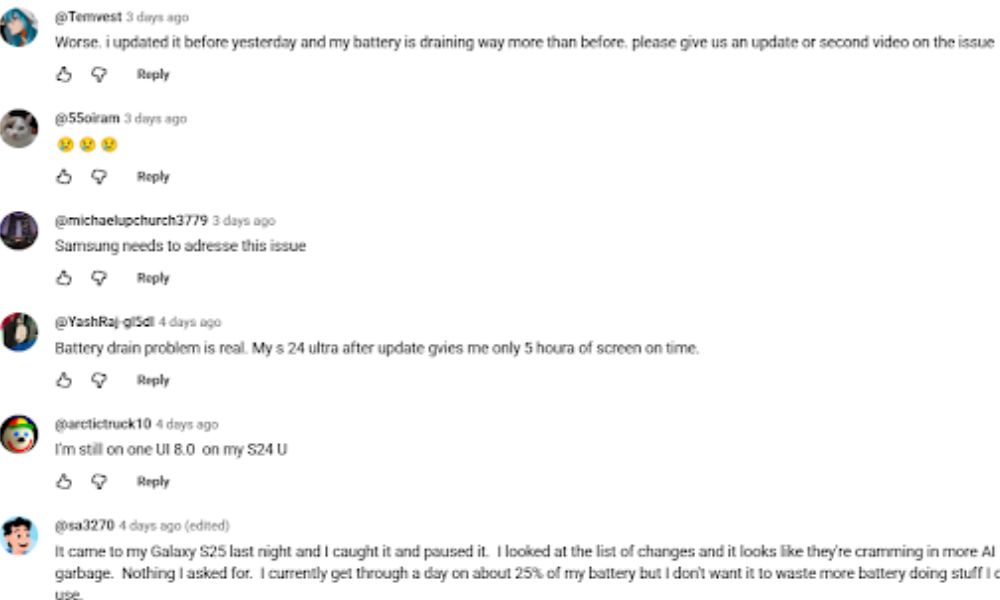
Several users reported that their devices lost more than 70–80% battery in a single day after updating. In most cases, the issue appears during the first few days after installation because the system performs background optimization, app indexing, and storage reorganization.
Why Battery Drain Happens
After a major Android or One UI update, Samsung devices usually:
- Rebuild application cache
- Optimize battery usage patterns
- Re-index media and files
- Sync Galaxy AI background services
These tasks increase CPU activity temporarily, leading to heating and faster battery consumption.
Possible Fixes
Users have reported improvements after trying the following methods:
- Clear cache partition from Recovery Mode
- Update all Samsung apps through Galaxy Store
- Use Galaxy App Booster from Good Lock
- Restart the device regularly during the first few days
- Reset battery statistics by fully charging and draining once
For some T-Mobile Galaxy S25 users, uninstalling updates for the “Mobile Services” app temporarily reduced battery drain significantly.
Although Samsung has not officially confirmed a wide photo editing app spread battery bug, future optimization patches are expected.
Galaxy Enhance-X Missing Features Problem
Many of the users experiencing the Samsung’s Galaxy Enhance-X photo editing app also experienced issues after the One UI 8.5 update.
Users noticed that some AI editing tools, including:
- Filter Styles
- Glow Effects
- Advanced Enhancement Features
were either missing or unavailable after updating.
Samsung acknowledged the issue and confirmed that the missing tools are caused by software compatibility problems with the latest One UI version.
Important Warning
Samsung advised users not to uninstall the Enhance-X app because reinstalling it may not work properly during the current rollout phase.
A staged app update is already being released through Galaxy Store to restore the missing features.
Voice Recorder App Crashing With Galaxy AI
Another major issue Samsung has addressed involves the impact of the Samsung Voice Recorder application on devices, along with effective methods to manage and optimize its performance.
- Galaxy S25 series
- Galaxy Z Fold 7
- Galaxy Z Flip 7
- Galaxy S24 lineup
The app crashes while summarizing recordings using Galaxy AI’s on-device processing feature.
This problem became common after users attempted to generate AI summaries for long voice recordings.
Samsung’s Official Fix
Samsung quickly acknowledged the bug and released an updated Voice Recorder version.
Users should update the app to:
Version v21.5.86.26 or higher
through the Galaxy Store to resolve the crashing issue.
Missing Galaxy S26 Features on Older Devices
According to the search many Samsung users expected One UI 8.5 to bring several Galaxy S26 software features to older flagship devices. However, some AI functions remain unavailable on Galaxy S25 series phones despite having capable hardware.
Missing features include:
- Now Nudge AI
- Enhanced Notification Intelligence
- 24MP Camera Mode
- Horizon Lock
- Samsung Browser Ask AI
This has disappointed users because competing brands often backport premium software features more aggressively.
Samsung has not classified this as a software bug. Instead, it appears to be a feature limitation strategy for newer devices.
At the moment, there is no official workaround except waiting for future One UI beta updates or community-developed modifications.
Notification Panel Visual Glitch
Some users noticed a strange visual bug inside the notification shade after updating to One UI 8.5.
The issue causes:
- Notification settings icon to appear smaller
- Misaligned settings button placement
- Slight UI shifting in Quick Panel
The functionality remains unaffected, but the appearance looks inconsistent.
Temporary Solution
Users can temporarily fix the issue by:
- Closing the notification panel
- Reopening Quick Settings again
Samsung is expected to resolve this cosmetic bug in a future stability update.
Camera Features Moved Instead of Removed
Several users initially believed Samsung removed camera features such as:
- Dual Recording
- Single Take Moves
after updating to One UI 8.5.
However, these tools were not deleted. Samsung relocated them to the Camera Assistant module within the Good Lock application.
This change confused many users because the features no longer appear inside the default camera interface.
How to Access Them
- Install Good Lock from Galaxy Store
- Open Camera Assistant
- Enable the required camera functions
This is considered an intentional design change rather than a software bug.
Settings App Lag and System Stability Problems
Some Galaxy S, M, and A series devices — especially Exynos-powered models — are reportedly experiencing:
- Settings app freezing
- Slow submenu loading
- Random UI hangs
- Factory reset error loops
- Occasional performance stuttering
In some severe cases, users reported temporary boot-loop-like behavior after resetting their phones.
Although the problems are not affecting every device, Samsung community forums have seen increasing complaints regarding system stability after the One UI 8.5 rollout.
Recommended Workarounds
Users can try:
- Clearing cache partition
- Disabling unnecessary background apps
- Updating Google Play system updates
- Performing a clean factory reset if problems continue
Samsung is likely collecting user feedback before releasing a broader optimization patch.
5G Connectivity and Thermal Throttling Issues
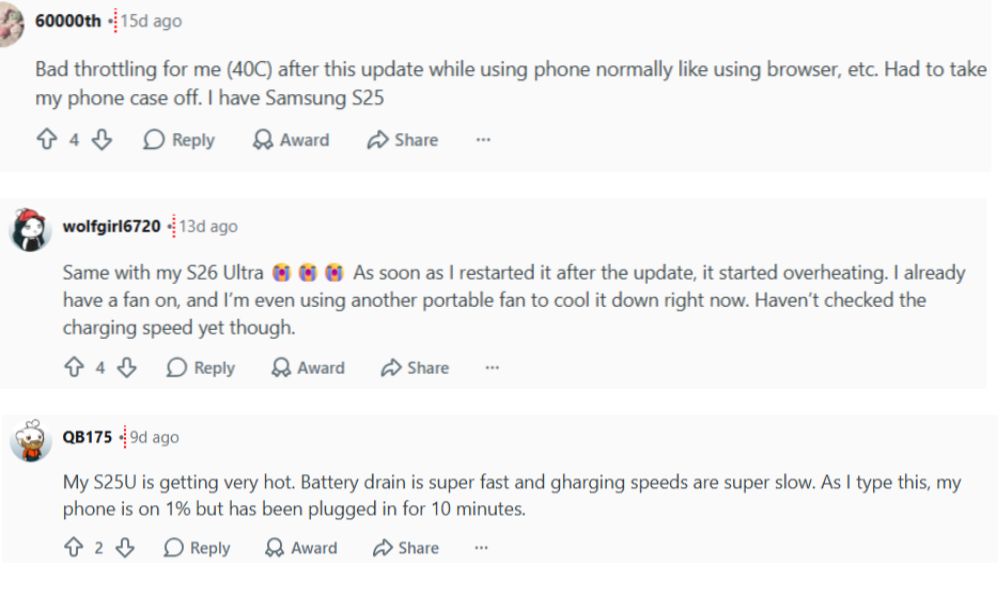
Users reported that 5G connectivity weakens or disconnects when device temperatures reach around 42°C.
This thermal throttling behavior affects gaming, hotspot usage, and heavy multitasking.
Compared to some competing smartphones, Samsung devices appear to reduce modem performance more aggressively to control heat generation.
At the moment, Samsung has not officially responded to these complaints.
Good Lock and Memory Guardian Freezing Problems
Samsung’s Good Lock customization suite also appears to have compatibility issues with One UI 8.5. Many users have reported freezing and stuttering issues after the update, making it one of the most frustrating problems affecting the overall user experience.
Some users reported that using the “Clean Now” option inside Memory Guardian causes:
- Navigation bar freezing
- Temporary performance lag
- Increased heating
- Delayed gesture response
The issue seems linked to aggressive RAM cleanup processes conflicting with Android 16 memory management.
Temporary Advice
Until Samsung releases fixes, users should:
- Avoid excessive memory cleaning
- Keep Good Lock modules updated
- Restart devices occasionally after heavy customization usage
Conclusion
One UI 8.5 introduces useful upgrades with better AI integration, enhanced customization options, and smoother system performance, but the update also comes with several early-stage bugs and optimization issues. Battery drain, app crashes, UI glitches, connectivity instability, and lag in certain Samsung devices have affected the experience for many users after installation.
Fortunately, Samsung has already started releasing fixes for confirmed problems such as Voice Recorder crashes and Galaxy Enhance-X issues, while other concerns are expected to improve through future software patches. Some missing features are not actual bugs but strategic limitations reserved for newer Galaxy devices. Users can reduce many problems by updating apps through Galaxy Store, clearing cache partitions, and avoiding aggressive memory-cleaning tools.
Overall, One UI 8.5 feels promising but still needs refinement to deliver a fully stable experience. Upcoming maintenance updates will likely improve stability, battery optimization, and compatibility across supported Galaxy smartphones.