
Apple has officially released the iOS 26.5 update for all iPhone 11 models and newer iPhones. Although Apple already introduced iOS 27 at WWDC in June, the stable public rollout is expected in September, making iOS 26.5 one of the final major updates in the iOS 26 series.
Let’s take a look at the major and minor changes introduced with the iOS 26.5 update.
One of the first noticeable differences is the update size, which may vary depending on your current iOS version and device model. Users are strongly advised to download and install the update using a stable Wi-Fi connection instead of a mobile hotspot or unstable network. In many cases, interrupted connections can cause installation issues or failed updates.
The biggest highlight of iOS 26.5 is the addition of enhanced RCS messaging support, bringing improved communication features, better media sharing, and a more modern messaging experience between devices.
Apple has also introduced new Pride Luminance wallpapers, offering additional color styles and customization options so users can personalize their iPhone interface more creatively.
Most of the refinements in iOS 26.5 focus on Apple Maps, with improvements aimed at smoother navigation, better location accuracy, and an enhanced overall user experience.
What are the Major and Minor Changes in iOS 26.5 Update?
Size:
The update size may increase or decrease depending on your current software version and the iPhone model you are using. For some users, the update may appear around 2GB, 5GB, or even close to 10GB, so there is no need to worry about the file size. Since this is a minor update, the download size can vary from device to device.
End to End Encryption and Network updates:
With the iOS 26.5 update, Apple has also addressed several network connectivity and Wi-Fi-related issues, helping improve overall stability and connection performance on supported iPhones.
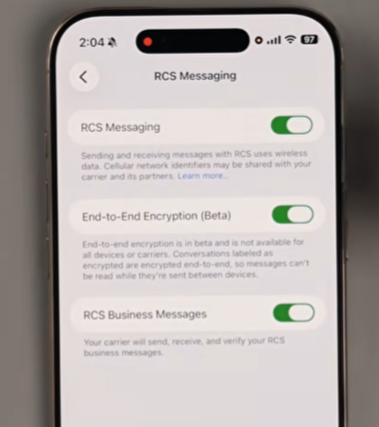
To check the new RCS messaging features, open Settings, scroll down to Apps, tap Messages, and then navigate to the RCS Messaging section. Some users may notice a new End-to-End Encryption (Beta) option available within the settings.
The availability of this feature depends on your carrier network and regional support, which means it may not appear for every user immediately. Apple and network providers are expected to expand support gradually, so availability can vary from country to country. If you cannot see the feature right now, it may become available in a future carrier update.
End-to-end encryption helps provide stronger privacy protection by ensuring that messages can only be read by the sender and receiver. If two users communicate using this feature, no third party can access or read their conversations. Many users have been requesting this added layer of security, and eligible users can now start benefiting from it where supported.
Pride Luminance Wallpapers:
To access the new Pride wallpapers in iOS 26.5, press and hold the Lock Screen, then tap the “+” icon to add a new wallpaper. Apple has introduced updated Pride wallpaper collections with several fresh color combinations and visual styles.
If you are not satisfied with the default color options, you can further personalize the wallpaper by selecting the Customize option. A built-in color picker is also available, allowing users to choose custom colors and create a unique Lock Screen style according to their preferences.
Apple Maps:
One of the major improvements in iOS 26.5 can be seen in Apple Maps. After opening Apple Maps and tapping the search bar, users will notice several new smart suggestions and category-based search options.
Apple Maps now provides quicker access to nearby places through categories such as fast food, gas stations, coffee shops, grocery stores, hotels, cafés, bars, and many more. These additions make it easier to discover useful locations without typing detailed search queries. Many of these shortcut categories were not previously available in earlier versions of Apple Maps.
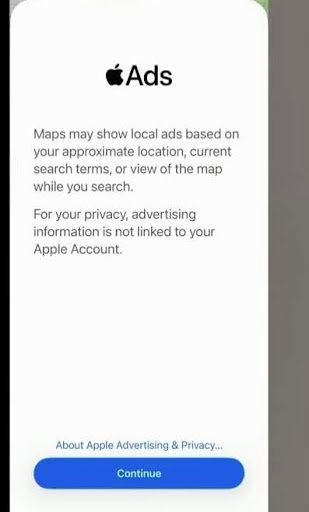
iOS 26.5 also introduces more personalized ad recommendations within Apple services. After updating, users may receive suggestions and promotional content based on their searches, preferences, and current location. Apple states that this advertising system is designed with privacy protection in mind, and users’ personal information is not shared with other individuals or third parties.
Notification sharing:
This feature is currently limited to select regions and is primarily available across the 27 European Union countries, including nations such as Denmark, Greece, Italy, and others. Users in countries like the United States and India are currently unable to access these features.
With this functionality, certain notifications and live activities can be shared with supported third-party devices, including smartwatches and other connected accessories. However, many users are disappointed that Apple has restricted the rollout to EU regions only, leaving global users waiting for wider availability in future updates.
Transfer to android Phones:
In iOS 26.5, Apple has also improved the iPhone data transfer experience. To access this feature, open Settings, go to General, and then select Transfer or Reset iPhone.
When transferring data from an iPhone to an Android device, users may now receive additional options related to message restoration and transfer duration. Apple allows users to choose how long messages and related data should remain available for restoration, such as a few days or several months, depending on their preference.
This provides greater flexibility and convenience during the migration process, especially for users switching from iPhone to Android. Previously, these advanced transfer management options were not available in earlier iOS versions.
Reminders:
iOS 26.5 also brings a small but useful improvement to the Reminders app. When creating a reminder, users can now quickly select specific preset times such as 5 AM or 5 PM directly from the suggestions.
Previously, the Reminders app mainly offered broader options like Morning or Evening without providing exact time shortcuts. This update adds more convenience and precision for users who prefer setting reminders at specific hours.
Other Updates:
iOS 26.5 also includes several important performance and stability improvements. Modern connectivity features, including 5G performance and overall network reliability, have been optimized to deliver a smoother user experience.
Apple has addressed multiple bugs and system issues, resulting in improved animations, better responsiveness, and fewer app crashes compared to previous versions. The update also fixes several CarPlay-related problems, including call connectivity issues that many users previously experienced while driving.
In addition, Apple has worked on battery optimization and thermal management, helping reduce overheating and improving overall device temperature control during regular usage.
Final Thoughts
The iOS 26.5 update brings several useful improvements and quality-of-life features for iPhone users. Apple has focused on better security, smoother performance, and improved connectivity.
One of the biggest highlights is RCS messaging with End-to-End Encryption (Beta), offering more secure conversations between supported devices. Users also get new Pride wallpapers with advanced color customization options.
The update improves Apple Maps with smart category suggestions like restaurants, hotels, coffee shops, and gas stations for easier navigation. Apple has also fixed multiple Wi-Fi, network, CarPlay, battery heating, and thermal management issues, resulting in better stability and fewer crashes.
Additional features include improved reminder time shortcuts, enhanced iPhone-to-Android data transfer options, and modem optimizations for stronger 5G performance. Storage management has also been optimized, as some users may notice reduced system data usage and slightly increased available storage after updating. Overall, iOS 26.5 delivers a more refined and reliable iPhone experience.
FAQ
1. Are bugs and heating issues solved after the iOS 26.5 update?
Yes, Apple has fixed several bugs and optimized thermal management in iOS 26.5. Many users may notice reduced overheating, improved stability, smoother animations, and fewer app crashes compared to previous versions.
2. Is the Reminders app improved in the iOS 26.5 update?
Yes, iOS 26.5 introduces more precise reminder shortcuts. Users can now quickly select specific times like 5 AM or 5 PM instead of only general options such as Morning or Evening.
3. Can you easily transfer data to Android phones with iOS 26.5?
Yes, Apple has improved the data transfer process in iOS 26.5. Users now get better transfer and message restoration options when moving data from iPhone to Android devices.
4. Does the iOS 26.5 update improve battery life?
iOS 26.5 includes battery optimization and modem improvements that may help deliver better power efficiency, reduced heating, and more stable overall performance during daily use.
5. Does iOS 26.5 improve Apple Maps recommendations?
Yes, Apple Maps now offers smarter place suggestions, including restaurants, hotels, cafés, gas stations, grocery stores, and more, making location searches faster and more convenient.